
Download: [download id=”13″]
Intro:
This management packs can be used to check the expire date on all or specific certificates in the client/servers certificates store.
It uses the event log on the local client, to alert the OpsMgr unit monitor .
It is supposed to check once every day, and make a warning in the opsmgr if any certificates are close to the expire date.
This is the very first version. It has been tested in my test environments, and will soon be tested in production.
Please do not hesitate to report any bugs and please send suggestions for the next version you might have.
This was developed with the help of Kåre Rude Andersen and NetOp Solutions A/S
Have a great summer!
Install:
| 1.
Import the Management Pack into OpsMgr. |
|
| 2.
Place the program file (.exe) in a shared directory. All clients must have access to this file via the OpsMgr Rule Account Save the UNC Path for later use in the configuration |
|
| 3.
Open Properties window for the Rule called “Certificates: Run Script” |
|
| 4.
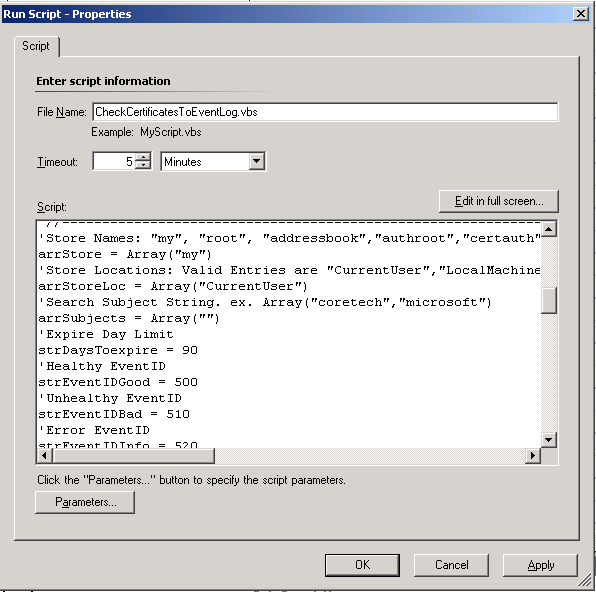
Click “Edit” in the “Configuration”-pane by the Responses box. Read the Configuration details below |
 |
| 5.
Both monitor and rule is disabled by default. Use the override function to enable it on specific computers, or just enable it on all. |
|
| 6.
System is now ready! |
Configuration:
Configuration can be found in the Rule Details, read the installation manual above.
arrStore = Array(“my”,”root”)
List of folders to check in each Store location
Valid entries: “my”, “root”, “addressbook”,”authroot”,”certauth”,”disallowed”,”trustedpeople”,”trustedpublisher” .
Example: Array(“my”,”root”)
arrStoreLoc = Array(“CurrentUser”,”LocalMachine”)
List of Certificate Locations to check
Valid Entries: “CurrentUser”,”LocalMachine”.
Array: (“CurrentUser”,”LocalMachine”)
arrSubjects = Array(“”)
List of subjects to search for
Example:. Array(“coretech”,”microsoft”)
strDaysToexpire = 1000
Limit in days, before the system should create an alert
strEventIDGood = 500
Event ID for the Healthy Event.
strEventIDBad = 510
Event ID for the unhealthy Event.
strEventIDInfo = 520
Event ID for info about the copy of the program file.
strSourcePath = “\\CTJGS\C$\CheckCertificateExpires.exe”
The UNC Path to the file, all monitored clients must have access to this folder.
strTargetPath = objShell.ExpandEnvironmentStrings(“%TEMP%”) & “\CheckCertificateExpires.exe”
Target path , where the script should place the file on local PC.
Default is the %TEMP% folder.
Usually there is not need to edit this parameter.
Script:
' //***************************************************************************
' // ***** Script Header *****
' //
' // Solution:  Ops Mgr
' // File:      CheckCertificatesExpirery.vbs
' // Author:	Jakob Gottlieb Svendsen, Coretech A/S. https://blog.ctglobalservices.com
' //
' // CORETECH A/S History:
' // 0.0.1     JGS 29/06/2008  Created initial version.
' //
' // Customer History:
' //
' // ***** End Header *****
' //***************************************************************************
'//----------------------------------------------------------------------------
'//
'//  Global constant and variable declarations
'//
'//----------------------------------------------------------------------------
Set objShell=CreateObject("WScript.Shell")
Set objFSO=CreateObject("Scripting.FileSystemObject")
Set oAPI = CreateObject("MOM.ScriptAPI")
'//----------------------------------------------------------------------------
'//
'//  Configuration
'//
'//----------------------------------------------------------------------------
'Store Names: "my", "root", "addressbook","authroot","certauth","disallowed","trustedpeople","trustedpublisher" . ex. Array("my","root")
arrStore = Array("my")
'Store Locations: Valid Entries are "CurrentUser","LocalMachine". ex. Array("CurrentUser","LocalMachine")
arrStoreLoc = Array("CurrentUser")
'Search Subject String. ex. Array("coretech","microsoft")
arrSubjects = Array("")
'Expire Day Limit
strDaysToexpire = 90
'Healthy EventID
strEventIDGood = 500
'Unhealthy EventID
strEventIDBad = 510
strEventIDInfo = 520
'The UNC Path to the file, all monitored clients must have access to this folder.
strSourcePath = "\\CHI-RMS\Cert\CheckCertificateExpires.exe"
'Target path , where the script should place the file on local PC.
strTargetPath = objShell.ExpandEnvironmentStrings("%TEMP%") & "\CheckCertificateExpires.exe"

'//----------------------------------------------------------------------------
'//  Main routines
'//----------------------------------------------------------------------------

Do
	If objFSO.FileExists(strTargetPath) Then
		If objFSO.GetFileVersion(strTargetPath) = objFSO.GetFileVersion(strSourcePath) Then
			strText = ""
			strCount = 0
			For Each storeloc In arrStoreLoc
				For Each store In arrStore
					For Each subject In arrSubjects
						strCommand = strTargetPath & " """ & strDaysToExpire & """ """ & subject & """ """ & store & """ """ & storeloc & """"
						'WScript.Echo strCommand 'just for debugging
						Set returnCmd = objShell.Exec(strCommand)
						'Loop while process is running
						Do
							WScript.Sleep 10
							Do Until returncmd.StdOut.AtEndOfStream
								strText = strText & returncmd.StdOut.ReadLine() & vbCrLf
							Loop
						Loop Until returncmd.Status <> 0 And returncmd.StdOut.AtEndOfStream
						If returncmd.ExitCode <> 0 Then
							strCount = strCount + returncmd.ExitCode
						End If

						bRetry = False
						'Clear object before next
						Set returnCmd = Nothing
					Next
				Next
			Next
		Else
			Call oAPI.LogScriptEvent(WScript.ScriptName, strEventIDInfo, 0, "CheckCertificateExpires.exe Not the correct version, Copying file and retrying..")
			'Copy file
			Call objFSO.CopyFile(strSourcePath, strTargetPath)
			'WScript.Echo "Cannot find exe file"
			bRetry = True
		End If
	Else
		Call oAPI.LogScriptEvent(WScript.ScriptName, strEventIDInfo, 0, "CheckCertificateExpires.exe Not Found, Copying file and retrying..")
		'Copy file
		Call objFSO.CopyFile(strSourcePath, strTargetPath)
		'WScript.Echo "Cannot find exe file"
		bRetry = True
	End If
Loop While bRetry = True

'Put In logo and cleanup output text from exe
strText = Replace(strText,"CheckCertificates Utility Developed by Coretech A/S. https://blog.ctglobalservices.com","")
strText = strText & vbCrLf & "CheckCertificates Management Pack Developed by Coretech A/S. https://blog.ctglobalservices.com"

If strCount > 0 Then
	Call oAPI.LogScriptEvent(WScript.ScriptName, strEventIDBad, 2, "Some Certificates are expiring soon, the different lists from each location, is shown below." & vbCrLf & strText)
Else
	Call oAPI.LogScriptEvent(WScript.ScriptName, strEventIdGood, 4, "All Certificates are valid within the specified timespan.")
End If
That should be it for now!
Please bring your feedback 🙂





Hi Mate,
this is really good stuff howevere I have a Question. in OpsMgr as per my understanding Agent would need Cert when they are in Workgroup Or DMZ (behind firewall), now in most case the UNC path will not be accessable from agent so then how to proceed further?
Regards.
Hello Parry
I can see your problem, but as the script works now, it is not possible to use it on clients/servers, that does not have access to the UNC path.
otherwise you would need to ditribute the CheckCertificateExpires.exe to the computer by yourself, and modify the sciprt, so that it does not copy the file automaticly.
But this MP was ment to check other certificates on the clients and not the OpsMgr communication cert. There is already a buildin monitor that you can use to monitor the opsmgr cert, as far as i know.
regards
jakob
Thanks Jakob,
So, can you modify the script so, that copying the EXE manualy to each agents %Temp% directory & that would solve my issue and it will make this as a real good stuff. becuase once the script is successful then it will log respective event in the event logs and OpsMgr can read such events from the log & Alert.
Hello
sorry i do not have time at the moment to do a new version, and test it and so on.
but i will remember it for the next version, making it possible to choose to copy it or not.
Regards
Jakob
Hi Jakob,
It seems there will be an infinite loop if the exe file cannot be copied. At the first check, if the file does not exists at the target, the script will try to copy it. But if e.g. the UNC path cannot be reached from the agent, the value of bRetry remains True and the loop never quits.
Robert
Hi! Does this work with scom2012? Is there any better way to do this in scom2012?