
Sample script at the end for this article.
I was recently at a customer that wanted to add new boundaries based on their DHCP-Scopes. This would be a very easy task if they only had a few, but they had well over a two-hundred scopes so I decided to create a PowerShell script to do the Job. One thing you need to bear in mind when doing this is that a DHCP-Scope can range from 10.10.10.1 – 10.10.10.254 which means when creating these boundaries that all client in this range are supported, no one is left out. However, a DHCP scope can also range from 10.10.10.100 – 200 which means that if a computer or server is not using DHCP but has been given an IP-address like 10.10.10.43 from an administrator which is outside the range and the computer or server has a ConfigMgr agent it would be left outside and would not be managed by ConfigMgr.
Well let’s go to the good stuff. First and foremost, we need to export the DHCP-Scopes to a comma separated CSV file. Run this command on your DHCP Server
Get-DhcpServerv4Scope | select Name,StartRange,Endrange | Export-Csv C:\Temp\DhcpServerv4Scope.csv
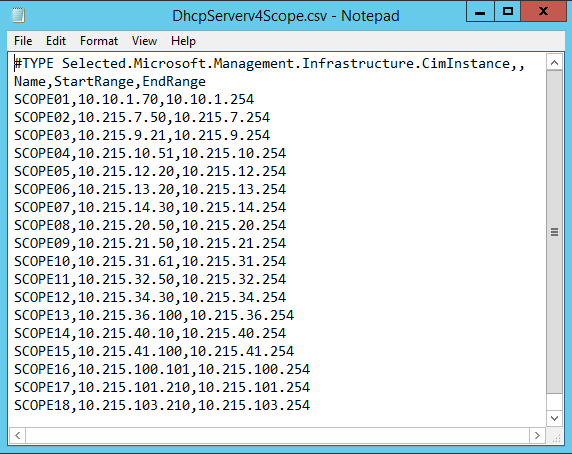
If you open the csv file in Notepad it should look something like this
Next save the csv file on a drive on your ConfigMgr Primary server where you want to import the Boundaries. In my environement I have used D:\Scripts
Then open a eleaveted PowerShell prompt and run the script as follows

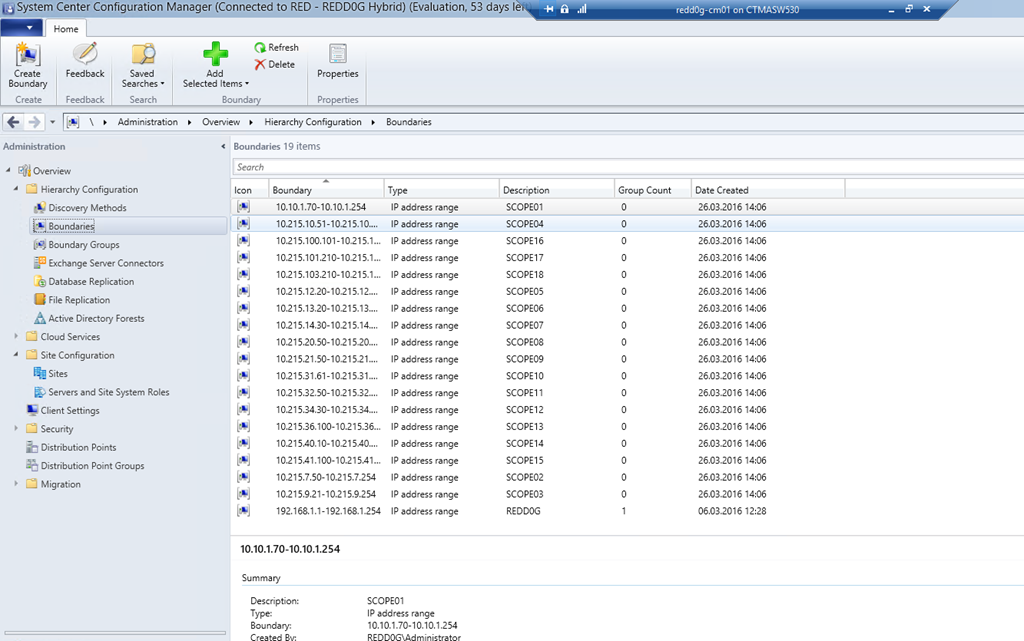
Then yous should be able to see all your newly created boundaries in your ConfigMgr Console!
The Script:
<#
    .NOTES
    ===========================================================================
    Created on:    28.02.2016 09.31
    Created by:    Marius A. Skovli
    Organization:  Coretech
    Filename:      CreateBoundaries.
    ===========================================================================
    .DESCRIPTION
    Creates boundaries in SCCM Based on DHCP Scope.
#>

#----
# On DHCP Server run this to get CSV File:
# Get-DhcpServerv4Scope | select Name,StartRange,Endrange | Export-Csv C:\Temp\DhcpServerv4Scope.csv
#----

#----
# Import Module
#----

Import-Module $env:SMS_ADMIN_UI_PATH.Replace("\bin\i386","\bin\configurationmanager.psd1")

$SiteCode = Get-PSDrive -PSProvider CMSITE
Set-Location "$($SiteCode.Name):\"

#----
# Import Boundaries from CSV file
#----

$Boundaries = Import-Csv `
    -Path "$PSScriptRoot\DhcpServerv4Scope.csv"

            foreach($Boundary in $Boundaries){

                Write-Output -InputObject "Creating $($Boundary.Name)"

                #Create the Boundary
                New-CMBoundary `
                    -Name $Boundary.Name `
                    -Type IPRange `
                    -Value "$($Boundary.'StartRange')-$($Boundary.'EndRange')" |
                        Out-Null
            }
Do not forget to leave a comment if you have any questions – Have a great Easter! 







Thank you. Any possible to create up subnet boundaries base on dhcp scope by powershell? 🙂
I mean ip subnet. Auto correction is bad in phone.
[…] Allez voir son article parfaitement construit : ICI […]
[…] found the PS script for creating boundaries without much efforts from here. Big thanks to “Marius A. Skovli” !! But we struggled a bit to find a script for creating […]